Going though my tweets of the day, I noticed this aptly titled article in TechCruch by Mark Suster
Wow, finally, what I've been looking for. A how-to (and what-for) guide about blogging for a highly competitive industy, where "loose lips sink ships", along with all the must-have toolkits to put up in your blog. (I guess its upgrade time for this old blog. We'll see over the next few weeks).
Cool gadget aside, though, the issue about what to talk about is what's been worrying me about blogging. Yes, I'd like to share ideas with my fellow industry enthusiasts, but not to jeopardize my own companies.
Mark suggested to blog about the industry. Hmm.. somewhat save. There are lots of miscommunication and wrong informations about technology, especially internet, in Indonesia. I guess sharing my research on these (and get corrections) isn't too dangerous.
Sunday, March 27, 2011


Monday, March 21, 2011
Social Commerce Platform 8thBridge Raises $10 Million

Social Commerce Platform? Wow, but of course, people are selling through Facebook. Why not. Gotta keep track of this one.
Can do quick checkout from News feed - Check
Sell from Fan Page - Check
Indomog's own facebook store must be lame in comparison :( Well, I slap dash that one in two weeks, so what do you expect. Oh, well, next month, maybe...
Eduardo and Jumio

An article really pique my interest today: Eduardo Saverin (lead a team to) invests $6.5m in Jumio, A MOBILE AND INTERNET PAYMENT GATEWAY... What! Where? How?
What is this Jumio? Where does it operates? How is it different than Paypal, or more importantly, than my Indomog?
I searched (oops, I meant googled), I dug, nothing. Except a Forbes article saying, that yes, there are nothing to find yet. I guess we just have to wait and see.
I found somehing interesting in Jumio's blog, though. A listing of all the different flavors of online payments.
This is what I need to work my head around for the moment. What's the space, what's its margins, who are willing to pay for what, and how will I make money.
Indomog (www.indomog.com) handles payment for digital goods (online games). We make money from the margin between what discount the publisher gave us and the fee I have to pay for my 2000+ resellers (and advertising costs, operationg costs, etc etc). And for that I need good margins.
The ecommerce players wants to use our service. and why not, we may have indonesia's widest cash in distribution network outside of a bank (that is not affiliated with a telco). But they balked at anything above 3-4%. After all, the credit cards only charge them 2.5%. And we are smaller, right, so we should be cheaper? (what kind of reasoning is that)
But it costs a lot of money to get the cash into the system. and a lot to get it out. On the other hand, it costs (almost) nothing to move the cash around IN the system. hmm....
Would someone use the system for just P2P? to transfer credit between each other? I guess if eventually one of the "P" is a very desirable merchant, that will work. We have 79 games including Zynga now, so that can be one, Mobile Phone pulsa is another, Facebook credit next month, Then Google's (and SITTI's),
Will that be enough? ... I wonder...
Wednesday, February 9, 2011
How to backup your Blackberry's Contact
This is for all my friends
You've heard your friend's Blackberry crashed, and he/she has begged you to resend your contact details. You pray it will never happen to you. Well, guess what. Most likely, it will, and it will happened in the most unfortunate time.
If you're lucky enough (like all of you PMG guys :) and you use BES (and pay an arm an a leg every month for it) oh well, you're covered. just call helpdesk and tell them to reactivate your bb.
If not, then you better backup your blackberry. and yes, do it now. RIGHT NOW. please!
You got two options.
If you still have your original blackberry CD, that cd contains the Blackberry Desktop Manager. Use that. it will backup everything. Contacts, Applications, the works.
And Its easy enought to use, So... I won't be covering that today.
For a quick alternative, use Google Synch.
This will only backup your contacts. But well, for a free solution, its not bad.
Step 1
Get a Gmail account: http://www.gmail.com
Step 2
Install Google Mobile App: http://www.google.com/mobile/synch
PS. you should do this while you're on the fastest internet connection possible: 3G or even WIFI if possible. I won't cover how to connect to WIFI on your BB, but if you need to know, just ask me.
1. Open your Internet Browser on your BB
2. goto http://www.google.com/mobile/synch
3. Choose "SYNC" in one of the list shown (bukan Google Mobile App)
4. Choose "Install This"
5. Choose "Download" and wait for your application to download
6. Once downloaded, choose "Run"
7. Enter your gmail Email and Password and click "Sign In"
8. Read the Welcome screen, and Click "Configure Synch".
9. Configure these options:
- When to Synch: Automatic
- [X] Sync Contacts
- [ ] Synch Calendar (unless you do want to save your calendar)
10. Click the [BB] (menu) button and choose "Save"
11. it will show when was the last successful sync
12. Now find a quiet spot with good internet connection where you can be there for hours. Maybe you should wait till you're at home at night with your BB plugged in
13. Click the [BB] (menu) button and choose "Sync Now"
14. and wait.
This will backup your entire contact to your Gmail account. and keep them synchronized.
If and when your BB crashed. you just reset it (or even buy a new BB), and then install the Google Sync again. following these same steps will recover you all your contacts.
Donald
You've heard your friend's Blackberry crashed, and he/she has begged you to resend your contact details. You pray it will never happen to you. Well, guess what. Most likely, it will, and it will happened in the most unfortunate time.
If you're lucky enough (like all of you PMG guys :) and you use BES (and pay an arm an a leg every month for it) oh well, you're covered. just call helpdesk and tell them to reactivate your bb.
If not, then you better backup your blackberry. and yes, do it now. RIGHT NOW. please!
You got two options.
If you still have your original blackberry CD, that cd contains the Blackberry Desktop Manager. Use that. it will backup everything. Contacts, Applications, the works.
And Its easy enought to use, So... I won't be covering that today.
For a quick alternative, use Google Synch.
This will only backup your contacts. But well, for a free solution, its not bad.
Step 1
Get a Gmail account: http://www.gmail.com
Step 2
Install Google Mobile App: http://www.google.com/mobile/synch
PS. you should do this while you're on the fastest internet connection possible: 3G or even WIFI if possible. I won't cover how to connect to WIFI on your BB, but if you need to know, just ask me.
1. Open your Internet Browser on your BB
2. goto http://www.google.com/mobile/synch
3. Choose "SYNC" in one of the list shown (bukan Google Mobile App)
4. Choose "Install This"
5. Choose "Download" and wait for your application to download
6. Once downloaded, choose "Run"
7. Enter your gmail Email and Password and click "Sign In"
8. Read the Welcome screen, and Click "Configure Synch".
9. Configure these options:
- When to Synch: Automatic
- [X] Sync Contacts
- [ ] Synch Calendar (unless you do want to save your calendar)
10. Click the [BB] (menu) button and choose "Save"
11. it will show when was the last successful sync
12. Now find a quiet spot with good internet connection where you can be there for hours. Maybe you should wait till you're at home at night with your BB plugged in
13. Click the [BB] (menu) button and choose "Sync Now"
14. and wait.
This will backup your entire contact to your Gmail account. and keep them synchronized.
If and when your BB crashed. you just reset it (or even buy a new BB), and then install the Google Sync again. following these same steps will recover you all your contacts.
Donald
Saturday, October 9, 2010
Service Center Addresses for Electronic Producs in Indonesia
Copied from Alloperator's Blog
Here are the addresses for Electronic goods service centers in Indonesia
Here are the addresses for Electronic goods service centers in Indonesia
PHILIPS PHILIPS
PT. Gading Sari Elektronika
Jl. Tanah Abang I No.12Q – Jakarta Pusat
Telp. (021) 9131424, 9249295, 34835453
Fax. (021) 3813988
Email : gepta@cbn.net.idKomplek Pinang 8, JL Ciputat raya No.8F
Pondok Pinang Jakarta Selatan
Telp. (021) 75909053
Fax. (021) 75909056
JL Gading Kirana Timur, Blok H11 No.8
Kelapa Gading Barat Jakarta – Utara
Telp. (021) 45847729
Fax. (021) 9207745
Email : gepkg@cbn.net.idSHARP PANASONIC
Sharp Service Call Center Jakarta
Telp. (021) 4601705
Fax. (021) 4608709, 4608710, 4600725
Toll Free : 0800-122-5588Service Center
JL Dewi Sartika (Cawang II ) Jakarta 13630
Telp. (021) 8015710 – 8015720
Fax. (021) 8004368OLYMPUS / KONICA POLYTRON
JL.Gunung Sahari Raya No.78
Gedung Konica Lantai 2
Jakarta 10610
Jl. Slipi No 6 , Jakarta 11410
Telp : 021-5480808 ; Fax : 021-5301284
E-mail : service@polytron.co.idSony Ericsson LG
Customer Care Center
Telp. (021) 2701388
Telp. (021) 3858356/60 – 62302264/65 – 63863046/47
8848686 – 8856044 – 8856045KODAK Advante
PT.Macindo Swadesi
Kodak Authorised Service Centre
Komp.Graha Kencana Blok EN-EO
Jl.Perjuangan No.88 Kebun Jeruk
Jakarta Barat 11530
Telp. 021-53660787, 021-5494049JL. KH Zainul Arifin no.13A
Telp. (021) 6331924
Komp. THR Lokasari Blok C 34-39 JL.Mangga besar 9
Telp. (021) 6253258, 6263329
Komp. Taman Semanan Indah Blok D No.9, Duri Kosambi Cengkareng
Telp. (021) 5443594 – 5451293SONY SONY
JAKARTA (021) :
* Jl. Wahid Hasyim No. 12A Jakarta Pusat Telp. 3193 6779, 3193 6858
* Komp. Ruko Cempaka Mas Blok Q no.18, Jl. Let Jen. Soeprapto Telp. 4587 0995
* Ruko Kelapa Gading Square Blok F No. 22, Jl. Boulevard Barat Kelapa Gading Jakarta Utara Telp. 4587 0995
* Gedung Wisma Kodel, Jl. HR. Rasuna Said kav B4 Lt. 1 Telp. 522 1528, 612 0202, 601 8006
* Jl. Radio Dalam Raya Komp. Ruko Yado BL A/1A Jakarta Selatan Telp. 739 7836, 726 2103
* E-Mail Ratu Plaza Computer Center Lt. 1 No. 6C, Jl Jendral Sudirman 9, Jakarta Selatan 10270 Telp. (021) 3704 2217, 3704 2218
* Mangga Dua Mall Lt. 5 No. B 82 Jakarta Barat Telp. 612 6074
* Ruko Pelangi Jl. Taman Palem Lestari Blok F No. 27 Jakarta Barat Telp. 5595 7939, 5596 2728
* Komplek Pertokoan Harco Mangga Dua Blok N No. 29 Jakarta Barat Telp. 612 0202, 601 8006
* Komp. Glodok Plaza Blok C No. 3 Jakarta Barat Telp. 648 0054, 648 0055
* Ruko Citra Gran Blok R3/15 Alternatif Cibubur-Cileungsi Jakarta Timur Telp. 8430 0014BOGOR (0251) : Ruko Villa Indah Pajajaran, Jl. Raya Pajajaran Blok H No. 88 Telp 378 045
BEKASI (021) : Jl. Ahmad Yani Kalimalang Comercial Center Blok A5 No. 8 Telp. 885 3992, 8885 0114
TANGERANG (021) : Komp. Mahkota Mas, Blok J No. 58 Jl. MH. Thamrin Cikokol Telp. 5575 4423, 5575 4424 * Jl. Ir. H. Juanda Raya Ruko Ciputat Center, No 75A & 75B Gintung-Ciputat, Tangerang Telp. (021) 749 1640, 749 1641
CILEGON (0254) : Ruko Pondok Cilegon Indah Blok A 11 No. 4 Telp. 393 228
DEPOK (021) : Jl. Margonda Raya No. 1 Telp. 772 14733, 772 16917, 772 16918
Jakarta Barat : 021-6494322, 6120202, 6480054
Jakarta Pusat : 021-31936779, 3142702
Jakarta Utara : 021-6516117
Jakarta Timur : 021-84300014
Jakarta Selatan : 021-765030, 7396168
ELECTROLUX ARISTON
Jl. Hasyim Ashari No.17
Telp. 021-6331350, 6331351
Telp. (021) 5330059, 5308257, 5308260,5308242
Fax. (021) 5362758SANYO JVC
D’Best Fatmawati Lt.3
JL. RS Fatmawati No.15 Jakarta
Telp. (021) 75910846
Rukan Blok A Mangga 2 Raya Jakarta
Telp. (021) 6000143
Fax . (021) 6590972
JL. Letjen S. Parman Kav.91
Gedung Gapura mas Lt. Dasar
Telp. (021) 5668220 / 5668225
Fax . (021) 5668219
TOSHIBA Canon
PT. Topjaya Sarana Utama
Jl. Kalibesar Barat No. 50, Jakarta Barat
Telp.021-6911020
Jl. Angkur No.27, Pulo Mas
Jakarta Timur 13210
Telp. 021-4895413, 021-4754004Canon Digital Camera Service Center
Jl. Angkasa No.18 BD
Telp. 021-25686
Email : peter@datascript.co.id
SMS : 0811-811167
Datascript Service Division
Perkantoran Agung Sedayu Blok D No. 17
Jl. Mangga Dua Taya, Jakarta
Telp. 021-6260122, 021-6120858
Email : servis@datascript.co.id
SMS : 0811-822167PIONEER AKARI
Jl. KH. Zainul Arifin No. 13A
Jakarta
Telp. 021-6331859, 6331924Service Center
Telp. (021) 6120207 – 7694406 – 08001025274
(bebas pulsa)
E-mail : custserv@akari-corp.comCASIO SAMSUNG
PT. Kahar Duta Sarana – Divisi Casio
Jl. Dewi Sartika No. 293A, Cawang
Jakarta Timur 13640
Telp. 021-8008060/62/63/65
Fax. 021-8002220
Email : casio@cbn.net.id> Ruko ITC Roxy Mas Blok B1 No.9
Jl. KH. Hasyim Ashari, Jakarta Pusat
Telp. 021-63858088
Fax. 021-63858089
BRICA
Bright Camera Indonesia
Service Center
JL. Latumenten 19 blok H no. 23,
Komplek Perkantoran
Kota Grogol Permai,
Jakarta Barat
Layanan Brica :
customer-service@brica.co.idTelepon :
081-2112-9100 (jam kerja)
Wednesday, October 6, 2010
How to Improve Torrent Download
Ok, this one is for Mira.
Mir, to improve download speed of your uTorrent, you need to set up two things, the ROUTER, and the COMPUTER running uTorrent itself. I assume your house diagram looks like this:

Ok, then you need to do the following two steps
#1. figure out your broadband's real upload speed.
Use Speedtest.net. For FIRSTMEDIA, use this url:
Test the speed, and write down how many Kbps is the UPLOAD speed, and divide the number by 8, because you'd need the KBps (kilo BYTE per second) upload speed.
#1. Set up your uTorrent in your COMPUTER
If you want a step-by-step, follow this link.
But if you're familiar with uTorrent, what you need to set up are:
a. in Preferences->Connection, set a static port for your uTorrent: mine is 55461.
b. in Preferences->Bandwidth,
- set the maximum upload speed to 80% of your total upload speed. Note that this is in KBps, not in Kbps. I set mine to about 12 KBps.
- set Global maximum number of connection to 120
- set Maximum number of connected peer to 50
c. in Preferences->Queueing,
- set the maximum number of active torrent to 3
- set the maximum number of download to 2
#2. Set up your ROUTER for Port Forwarding.
The most complete guide to setting up your ROUTER can be find here:
Pick your router brand and type from the list and follow the instruction.
Again, if you're comfortable with the details, what you need to set up is basically two things:
a. Static IP Address

So your COMPUTER always use the same IP address.
I do this by modifying the DHCP configuration in the ROUTER to always assign a specific IP for my computer (my computer's MAC address).
b. Port Forwarding

So you specify the ROUTER to always map the one specific port you use for uTorrent directly to your computer's IP Address (this is why a static IP address is required).
That's all,
Follow these, and your torrent will pretty much max out your download bandwidth.
Happy downloading, Mir!
Donald
Mir, to improve download speed of your uTorrent, you need to set up two things, the ROUTER, and the COMPUTER running uTorrent itself. I assume your house diagram looks like this:

Ok, then you need to do the following two steps
#1. figure out your broadband's real upload speed.
Use Speedtest.net. For FIRSTMEDIA, use this url:
Test the speed, and write down how many Kbps is the UPLOAD speed, and divide the number by 8, because you'd need the KBps (kilo BYTE per second) upload speed.
#1. Set up your uTorrent in your COMPUTER
If you want a step-by-step, follow this link.
But if you're familiar with uTorrent, what you need to set up are:
a. in Preferences->Connection, set a static port for your uTorrent: mine is 55461.
b. in Preferences->Bandwidth,
- set the maximum upload speed to 80% of your total upload speed. Note that this is in KBps, not in Kbps. I set mine to about 12 KBps.
- set Global maximum number of connection to 120
- set Maximum number of connected peer to 50
c. in Preferences->Queueing,
- set the maximum number of active torrent to 3
- set the maximum number of download to 2
#2. Set up your ROUTER for Port Forwarding.
The most complete guide to setting up your ROUTER can be find here:
Pick your router brand and type from the list and follow the instruction.
Again, if you're comfortable with the details, what you need to set up is basically two things:
a. Static IP Address

So your COMPUTER always use the same IP address.
I do this by modifying the DHCP configuration in the ROUTER to always assign a specific IP for my computer (my computer's MAC address).
b. Port Forwarding

So you specify the ROUTER to always map the one specific port you use for uTorrent directly to your computer's IP Address (this is why a static IP address is required).
That's all,
Follow these, and your torrent will pretty much max out your download bandwidth.
Happy downloading, Mir!
Donald
Tuesday, June 29, 2010
Setup Blackberry as a Modem (for Telkomsel Flash)
I have always told people that the day of slow, "fake" 56Kbps broadband in Jakarta, and beyond, is over. We Indonesian have true broadband now, all over the place, (thanks to my fiber optic cable project, or so I'd like to believe, ha ha ha).
As proof of that, I always like to point out to Telkomsel Flash, which I like to demo with my blackberry. But unfortunately, I kept changing (or reconfiguring) my computer, and I kept forgetting how to set up my bb as a tethered modem. So hey, why not write my own blog about it.
Many blogs have been written on making a BB a tethered modem. If you use Blackberry Desktop Manager 5.0.1, it comes ALMOST preconfigured for Telkomsel Flash. (for those who still use older BDM 4.x.x, see here). I said ALMOST, because if you want to use basic Telkomsel 3G/GPRS "Internet" setting, it is one of the default setting in BDM 5.0.1. (see here for another step by step instruction)
Telkomsel Flash
Telkomsel has TWO types of GPRS/3G connection (actually 2 APN, 3 if you count Blackberry). the "internet" way sells internet in a per kilobyte fashion. But using this setting can be very dangerous to your wallet.
Telkomsel "Flash" is a more economical way to use internet. It has a PREPAID TIME BASED option, that you can even use with a standard throwaway prepaid card. It has a 3 hour package that's valid for a 24 hour period (that means any 180 minutes of use in a 24 hour period). or my personal favorite: the 24 hour (1440 minutes) valid for 7 days.
Now the thing is, in many place in Jakarta, and Bali (where I am now), this time base package delivers 3Mbps download / 300Kbps upload. I tried. Speedtest. Rapidshare (for all 24 hours). you named it, it passed it. Now THAT's (at least in Indonesian standard) BROADBAND.
How To Setup
Anyways, enough rambling. How do you set up the Telkomsel Flash version of the tethered blackberry.
1. Install Blackberry Desktop Manager 5.0.1 (or above). You can download this (its a 100MB file, sorry) from blackberry.com
2. Startup the Blackberry Desktop Manager, and plug in your Blackberry to your laptop via USB. Make sure the Desktop Manager recognize the Blackberry. You can see it in the bottom that your blackberry PIN is displayed under the "device connected".
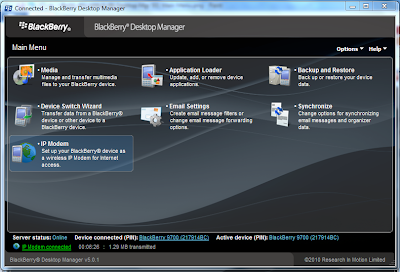
3. Choose the IP Modem option
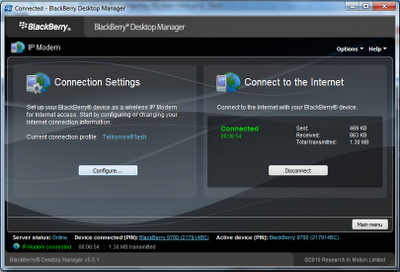
4. Click the Configure Button
5. A Set Up Connection screen will pop up. Similar to this one below.

6. Click the "Add Custom Profile" button, and enter the name "TelkomselFlash" as the new Profile.
7. in the entry of "Access Point" enter "flash".
8. click "OK" to save.
9. You should now be back in the IP Modem screen. Now click the "Connect" button.
10. The modem would start dialing, and you will end up with an active connection.
11. You still need to pick and buy the flash package.
12. Open a browser and browse anything, like www.google.com for example.
13. The Telkomsel Flash screen will open.


14. Choose a package you like.
15. Then you're free to use the internet.
16. REMEMBER to close down your connection whenever you stop using it, to stop the time based usage so you can use it later.
You're DONE!
Enjoy, and let me know what you think of Telkomsel Flash in particular, and Indonesian broadband (any brand) in general
Thanks
Donald
Subscribe to:
Posts (Atom)